
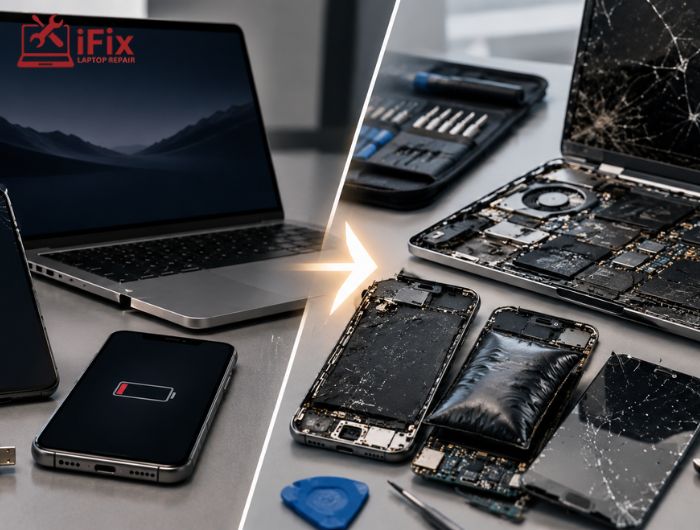
Most people ignore minor glitches until a device completely stops working. However, many major failures begin as small, easily fixable problems. Understanding the warning signs that indicate your device needs professional repair can help you avoid unexpected breakdowns, data loss, and expensive repair bills.
Whether it’s a laptop, desktop, tablet, or smartphone, early intervention often costs significantly less than waiting for a complete failure. In this guide, we’ll explain why small issues become larger problems, what warning signs you should never ignore, and how avoiding common tech mistakes that are slowly damaging your devices can save both time and money.
Why Small Device Problems Get Worse Over Time
Electronic devices are made up of interconnected components. When one part malfunctions, it often affects nearby components.
For example:
- A noisy laptop fan may indicate dust buildup.
- Excess heat can damage the processor and motherboard.
- A weakened battery can stress the charging system.
- A small liquid spill can gradually corrode internal circuits.
What begins as a minor inconvenience can quickly evolve into a costly hardware failure.
This is exactly why technicians recommend addressing early device problems before they escalate.
What Are The Most Common Device Issues People Ignore?
Many people delay repairs because their devices still appear functional. Unfortunately, some of the most serious failures start with subtle symptoms.
1. Overheating
If your device becomes unusually hot during normal use, it should not be ignored.
Possible causes include:
- Dust-clogged cooling systems
- Failing fans
- Aging thermal paste
- Restricted airflow
Overheating can damage processors, graphics chips, batteries, and storage drives.
- If you are dealing with heat issues, read this: Laptop Overheating? Smart Laptop Cooling Hacks You Can Try!
2. Slow Performance
A gradual slowdown is often dismissed as normal aging. In reality, it may indicate:
- Failing storage drives
- Malware infections
- Memory issues
- Background software conflicts
Identifying the cause early can help prevent costly repairs later.
3. Unusual Noises
Clicking, grinding, buzzing, or rattling sounds often signal hardware issues.
These noises may indicate:
- Hard drive failure
- Fan damage
- Loose internal components
Ignoring them can result in permanent data loss or hardware replacement.
- If you are also facing audio-related issues, read this: Laptop Sound Is Not Working? Fix Audio Issues in Minutes
4. Battery Problems
A battery that drains quickly, overheats, or causes unexpected shutdowns should be inspected immediately.
Battery issues can worsen rapidly and may even damage surrounding components if left unresolved.
5. Display Glitches
Flickering screens, dead pixels, random lines, or screen discoloration often point to developing hardware problems.
Early repair is usually less expensive than replacing an entire display assembly.
What Happens If You Ignore Device Issues?
Many users assume they are saving money by postponing repairs. In reality, delaying service often increases repair costs.
Here is what can happen:
Small Issue | Potential Major Problem |
Dust buildup | Motherboard damage |
Slow system | Drive failure |
Weak battery | Charging circuit damage |
Fan noise | Processor overheating |
Minor liquid exposure | Internal corrosion |
Screen flickering | Complete display failure |
The cost of delaying device repairs is frequently much higher than addressing the issue when symptoms first appear.
How Expensive Are Delayed Repairs In 2025?
According to recent 2025 repair industry estimates from global service data (including independent repair networks and warranty analytics):
- Preventive cleaning or minor fixes cost up to 70% less than full hardware replacement
- Data recovery after drive failure can cost 3x–5x more than early replacement
- Overheating-related motherboard damage remains one of the top 5 most expensive repairs worldwide
These numbers show a clear pattern: delaying repair always increases cost.
This directly answers the cost of delaying device repairs in real-world terms.
What Are The Early Warning Signs Of Device Failure?
Recognizing problems early gives you the best chance of avoiding major repairs.
Watch for:
- Frequent crashes or freezes
- Unexpected restarts
- Excessive heat
- Strange noises
- Swollen batteries
- Slow boot times
- Charging issues
- Screen flickering
- Wi-Fi connectivity problems
- Error messages appearing repeatedly
These are some of the most important device repair warning signs that should never be ignored.
Device Repair vs Replacement: Which Is Better?
Many people immediately consider replacing a device when issues arise.
However, device repair vs replacement depends on several factors:
Repair is often the better choice when:
- The device is relatively new.
- Repairs cost significantly less than replacement.
- Performance remains adequate after repair.
- Important data is stored on the device.
Replacement may be necessary when:
- Repair costs exceed device value.
- Multiple major components have failed.
- Hardware is obsolete and unsupported.
A professional diagnostic assessment can help determine the most cost-effective option.
How To Extend Device Lifespan? Device Maintenance Tips To Avoid Expensive Repairs
Regular maintenance can dramatically reduce hardware failures.
Follow these device maintenance tips:
Keep Devices Clean
Dust accumulation restricts airflow and increases temperatures.
Update Software Regularly
Updates often contain security patches and performance improvements.
Avoid Physical Damage
Use protective cases and avoid placing devices in risky environments.
Monitor Battery Health
Replace aging batteries before they begin affecting other components.
Back Up Important Data
Hardware failures can happen unexpectedly, even with proper maintenance.
Schedule Routine Inspections
Professional diagnostics can identify hidden issues before they become serious.
These simple habits can help extend device lifespan while reducing repair costs.
→ Need Professional Device Diagnostics?
Not sure whether a small issue is becoming a bigger problem?
Our experienced technicians can identify hidden faults, recommend the right solution, and help you avoid unnecessary expenses.
Can Minor Device Issues Cause Major Damage?
The short answer is yes.
Many technicians regularly see cases where:
- Minor overheating destroys motherboards.
- Small charging issues damage power systems.
- Tiny liquid spills cause extensive corrosion.
- Failing storage drives lead to permanent data loss.
This is why understanding device repair warning signs and responding quickly is so important.
👉 Call Our Repair Experts Today
Experiencing overheating, battery problems, slow performance, or unusual device behavior? Our technicians are ready to help diagnose the issue and recommend the most cost-effective solution.
Final Thoughts
Small device problems rarely fix themselves. In most cases, they worsen gradually until repairs become more complicated and expensive.
By recognizing device repair warning signs early, addressing common device issues, and taking preventive action, you can protect your investment, reduce downtime, and avoid major repair bills.
The next time your device starts showing unusual behavior, don’t ignore it. Early attention today could save you hundreds of dollars tomorrow.
FAQs
What are the first signs of device failure?
Slow performance, overheating, random crashes, and battery issues are early signs.
Can ignoring small issues damage a device completely?
Yes, small faults often grow into major hardware failures over time.
How often should I service my device?
At least once a year for cleaning and performance checks.
Is repairing better than replacing a device?
Repair is better if the damage is minor and cost-effective compared to replacement.
What is the biggest cause of device failure?
Overheating and dust buildup are among the most common causes.
