
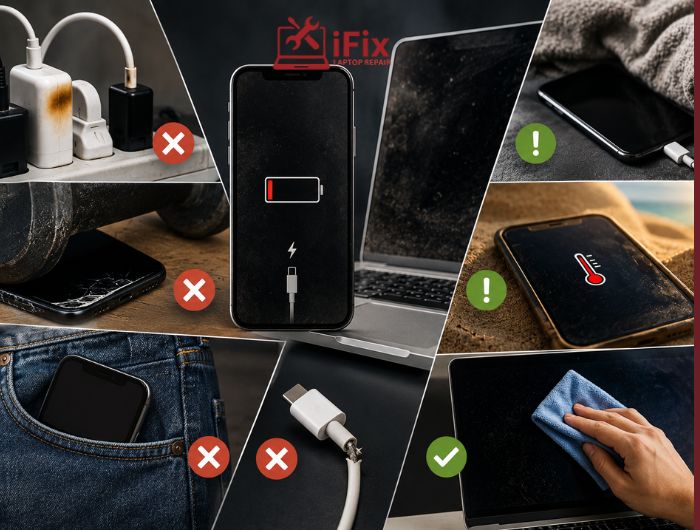
Many people replace laptops, phones, and computers sooner than necessary without realizing that everyday habits are causing the problem. These common tech mistakes can gradually reduce performance, shorten battery life, increase repair costs, and even lead to permanent hardware failure. The good news is that most of these issues are preventable.
Understanding what damages electronics over time helps you make smarter decisions about device care. Whether you use a laptop for work, a desktop for gaming, or a smartphone for daily communication, a few simple adjustments can help you avoid expensive repairs and keep your devices running longer.
Why Devices Fail Earlier Than Expected
A common question people ask is: why devices fail early?
In many cases, devices do not fail because they are old. They fail because small maintenance issues build up over time. Heat, dust, poor charging habits, physical stress, and neglected updates can all contribute to long-term damage.
Quick Summary
- Excessive heat wears down internal components.
- Dust restricts airflow and cooling.
- Improper charging habits affect battery health.
- Ignoring maintenance increases failure risks.
- Physical mishandling can damage internal hardware.
Actionable Takeaway
Treat your devices like valuable tools rather than disposable products. Small maintenance efforts can prevent major problems later.
Mistake #1: Ignoring Dust and Dirt Build-Up
One of the most overlooked causes of device damage is dust accumulation.
Dust blocks cooling vents and fans, making it harder for devices to regulate temperature. Over time, components operate under greater stress, which can reduce their lifespan.
- According to hardware maintenance reports, dust buildup is responsible for nearly 40% of cooling-related performance issues in desktop PCs.
How Often Should You Clean Your Computer?
For most users:
- External cleaning: Weekly
- Keyboard cleaning: Every 2-4 weeks
- Vent and fan cleaning: Every 3-6 months
- Professional internal cleaning: Annually if heavily used
If you have pets or live in a dusty environment, cleaning may be needed more frequently.
→ Clean Inside, Better Performance Outside
Dust inside your computer can quietly reduce speed and cause overheating. A quick internal cleaning can make a noticeable difference.
Real-World Example
A laptop used daily on a fabric couch can pull lint and dust into its vents. Within months, airflow may become restricted, causing higher temperatures and reduced performance.
Actionable Takeaway
Keep air vents clear and clean devices regularly using appropriate cleaning tools designed for electronics.
Mistake #2: Blocking Ventilation and Ignoring Overheating
Can Overheating Damage a Laptop?
Yes. Overheating is one of the leading contributors to hardware degradation.
When internal temperatures remain high for extended periods, processors, batteries, and storage components experience increased wear. While modern devices have safety mechanisms, repeated exposure to excessive heat can shorten their lifespan.
- Studies show that sustained high temperatures above safe operating limits can reduce laptop battery lifespan by up to 20–40% faster than normal conditions.
Common Causes of Overheating
- Using laptops on beds or blankets
- Blocking air vents
- Dust-filled cooling systems
- Running demanding software continuously
- Hot environmental conditions
Signs Your Computer Is Wearing Out Due to Heat
- Frequent fan noise
- Unexpected shutdowns
- Slow performance
- Screen freezing
- Battery swelling
Actionable Takeaway
Use devices on hard, flat surfaces and monitor temperatures during demanding tasks.
👉 Need a Device Health Check?
If your laptop is overheating, slowing down, or shutting down unexpectedly, professional diagnostics can identify problems before they become costly repairs.
Mistake #3: Leaving Devices Plugged In All the Time
Many users wonder: Does charging overnight damage electronics?
For modern devices, occasional overnight charging is generally safe because built-in systems manage charging cycles. However, constantly keeping batteries at 100% charge for extended periods may contribute to long-term battery wear.
Better Charging Habits
- Avoid extreme battery levels whenever possible.
- Keep devices away from excessive heat while charging.
- Use manufacturer-approved chargers.
- Unplug devices once fully charged when practical.
Limitations to Consider
Battery aging is natural. Even perfect charging habits cannot completely prevent battery degradation, but they can slow the process.
→ Is Your Battery Draining Too Fast?
A weak battery can cause sudden shutdowns and poor device performance. Replacing it restores reliable power and longer usage time.
Actionable Takeaway
Focus on reducing heat during charging rather than worrying about occasional overnight charging.
Mistake #4: Skipping Software and Security Updates
Many users postpone updates because they seem inconvenient.
However, updates often contain:
- Security patches
- Performance improvements
- Hardware compatibility fixes
- Stability enhancements
Ignoring updates can create vulnerabilities and contribute to system instability.
How Does It Affect Hardware?
Outdated software may cause applications to run inefficiently, increasing processor workload and heat generation.
Actionable Takeaway
Enable automatic updates whenever possible and schedule installations during non-working hours.
Mistake #5: Using Cheap or Unverified Accessories
Not all chargers, cables, batteries, and power adapters meet proper safety standards.
Poor-quality accessories can:
- Deliver unstable power
- Generate excess heat
- Damage charging ports
- Reduce battery performance
Cost Considerations
A low-cost charger may save money initially, but replacing a damaged charging circuit or battery can cost significantly more.
Actionable Takeaway
Choose reputable accessories designed specifically for your device model.
→ Unsure Whether an Accessory Is Safe?
Using the wrong charger or cable can create hidden risks for your device.
Mistake #6: Ignoring Warning Signs
Many users continue using devices despite obvious problems.
Common Signs Your Computer Is Wearing Out
- Slow startup times
- Frequent crashes
- Overheating
- Battery drain
- Strange noises
- Storage errors
Addressing these symptoms early can help prevent hardware failure before it becomes irreversible.
Real-World Scenario
A clicking hard drive may continue functioning temporarily, but delaying repairs could result in complete data loss.
Actionable Takeaway
Investigate unusual behavior promptly instead of waiting for a complete breakdown.
Mistake #7: Poor Physical Handling
Physical stress remains one of the most common computer care mistakes.
Examples include:
- Carrying laptops without protective cases
- Pulling charging cables aggressively
- Dropping devices
- Placing heavy objects on electronics
Even minor impacts can loosen connectors or damage internal components.
Actionable Takeaway
Use protective cases and handle devices carefully during transportation.
Mistake #8: Running Devices at Maximum Capacity Continuously
Heavy workloads are not necessarily harmful, but continuous operation without breaks can increase wear.
What Causes Hardware Failure in High-Performance Systems?
- Constant heat exposure
- Dust accumulation
- Insufficient cooling
- Aging power supplies
Users who edit videos, game extensively, or run resource-intensive applications should pay extra attention to maintenance.
Actionable Takeaway
Give systems adequate cooling and perform routine maintenance checks.
Technology Maintenance Tips That Actually Work
Many people search for practical technology maintenance tips but receive overly complicated advice.
The most effective habits are often simple:
Best Practices
- Keep devices clean.
- Install updates regularly.
- Use quality accessories.
- Avoid excessive heat exposure.
- Back up important data.
- Monitor battery health.
- Address small issues early.
Ways to Extend Device Lifespan
If you’re wondering how to make devices last longer, consistency matters more than perfection.
Small habits performed regularly often have a greater impact than occasional major maintenance efforts.
Actionable Takeaway
Create a quarterly maintenance checklist and stick to it.
Professional Device Repair and Maintenance
Regular maintenance can help identify hidden issues before they become expensive problems.
Conclusion
Most device failures do not happen suddenly. They develop through months or years of overlooked maintenance, excessive heat, poor charging habits, and physical wear. By avoiding these common tech mistakes, you can improve performance, reduce repair costs, and get more value from your devices.
Taking a proactive approach today is far less expensive than replacing damaged hardware tomorrow.
Whether your device is overheating, slowing down, showing warning signs, or simply due for maintenance, expert guidance can help you avoid unnecessary repairs and extend its lifespan.
FAQs
What damages electronics over time?
The most common causes include heat, dust accumulation, poor charging habits, physical damage, moisture exposure, and neglected maintenance.
How often should you clean your computer?
External cleaning should be done weekly, while internal cleaning is generally recommended every three to six months, depending on usage and environment.
Can overheating damage a laptop?
Yes. Prolonged overheating can reduce the lifespan of processors, batteries, and other internal components.
Does charging overnight damage electronics?
Modern devices manage charging automatically, but constant exposure to high battery levels and heat may contribute to long-term battery wear.
What causes hardware failure?
Hardware failure can result from overheating, dust buildup, power fluctuations, physical damage, aging components, and inadequate maintenance.
How can I extend the lifespan of my devices?
Regular cleaning, proper charging habits, software updates, quality accessories, and early repairs are among the best ways to extend device lifespan.
