




Laptop Keyboard Repair in Las Vegas!

20 Years of Expert Laptop Keyboard Repair in Las Vegas
Why is my keyboard acting weird? Can’t type on the keyboard due to sticky keys, broken keys, or a broken keyboard clip? Liquid spills can also cause the keyboard to not type letters or cause issues like “Why does my keyboard randomly stop working? Trust us for expert laptop keyboard repair in Las Vegas!
We provide expert laptop keyboard repair in Las Vegas with accurate diagnosis and reliable solutions. With 20+ years of experience, A+ Certified Technicians, and 20,000+ keyboards repaired, our service is trusted for quality results. We fix and replace individual keys and full keyboards for HP, Asus, Lenovo, and Dell, ensuring smooth, consistent typing performance.
Common Laptop Keyboard Problems We Repair
Sticky keys after liquid spills
Keyboard keys not responding
Laptop keyboard typing wrong characters
Broken keycaps and hinges
Keyboard backlight issues
Gaming keyboard ghosting
Motherboard-related keyboard failures
Ribbon cable connection problems

Brands Our Expert Laptop Technicians Fix


Advanced Laptop Keyboard Repairs, Diagnostics & Key Fixes
Our laptop keyboard repair services include diagnosis, keycap replacement, Razor Blade 15 key replacement, single-key malfunction, and HP laptop key replacement. We’ll fix your laptop keyboard to type smoothly again.
We also repair circuit issues, gaming keyboards, and resolve key ghosting and switch needs. Find out how much it costs to fix a laptop keyboard in Las Vegas and get efficient service for HP laptop spare keys and more. All repairs come with a 90-day warranty for added peace of mind.


Glorious Years

Satisfaction Rate

Devices Repaired

Happy Customers
Testimonial
What the Las Vegas Community Says About Us on Google
Our Google My Business reviews are the talk of the town! Discover how our same-day repair service in Las Vegas resolved their tech emergencies.
Not only did they fix and allow same-day pickup, but Abi stayed late to ensure it was completed.
100% transparent and honest, I'll come back here anytime I have laptop issues in the Vegas area
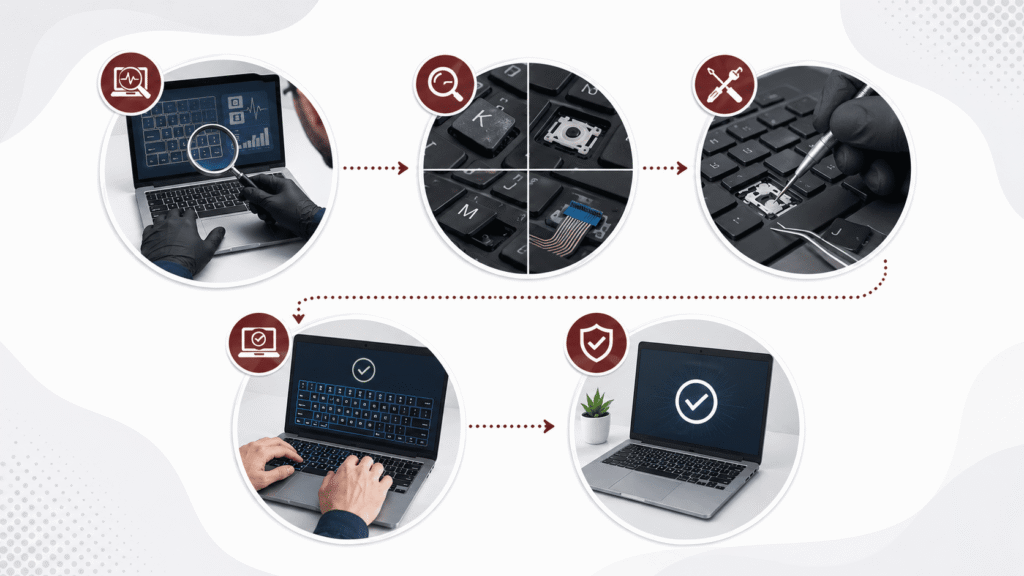
Our Laptop Keyboard Repair Process
- We start with a free keyboard check to find the exact issue
- Then we proceed with hardware and software testing to detect faults
- Next, we inspect keys and switches for any visible damage
- After that, we check internal cable connections for proper flow
- We then repair or replace any damaged keyboard components
- Once repaired, we carefully reassemble the keyboard
- Then we test all keys to ensure proper response
- Finally, we complete a quality check for smooth typing performance

Repair or Replace: What Does Your Laptop Need?
In many cases, individual keys, hinges, or connectors can be repaired. However, keyboards with liquid damage, severe corrosion, or extensive circuit failure may require complete replacement. As part of our professional laptop repair service in Las Vegas, our A+ certified technicians determine the most cost-effective solution during diagnostics.
Device Issues? Get Expert Device Repair Today
Get professional device repair with fast diagnosis, safe troubleshooting, and complete testing to ensure stable and reliable performance.
Let’s Get In Touch To Discuss Your Issue
We reply within minutes. Your solution is just one message away.
- 365 E. Windmill Lane #140 Las Vegas NV 89123
- Mon-Fri: 8:00 AM - 9:00 PM
Because We’re Repairing Keys and Bringing Back Your Productivity!
Our repair services are quick, reliable, and reasonably priced.
Free Diagnostics
We check your keyboard for free to find out what's wrong with it quickly.
Affordable Rates
Our keyboard repair prices are low and fair, so you can afford it easily.
High-Quality Parts
We use good quality keys and parts to fix your keyboard correctly every time.
Guaranteed Service
We promise to fix your keyboard right and help you if anything goes wrong.
FAQs
Clean and restore unresponsive keys to resolve most issues; if not, inspect the carriage for bent or misaligned parts before replacing the keyboard.
Identify the issue, clean or replace keys, and check connections to fix your laptop’s built-in keyboard
Enable your keyboard by pressing Windows key + X, opening Device Manager, right-clicking on the keyboard device, and selecting “Enable” if disabled.
Replacing a keyboard can be costly, but with iFix laptop repair, it can be done at a fair and affordable price.
No, gluing a broken keyboard key is never recommended; instead, replace it or have it professionally repaired by expert technicians.