





Laptop Touchpad Repair in Las Vegas!

Get Professional Laptop Touchpad Repair in Las Vegas!
A faulty touchpad can make everyday tasks frustrating, whether it’s an unresponsive cursor, broken clicks, or erratic movement. At iFixLaptopRepair, with over 20 years of expertise, we provide professional laptop touchpad repair in Las Vegas for all major laptop brands, helping restore smooth and accurate navigation.
Our technicians diagnose both hardware and software-related touchpad issues before recommending the right repair. Whether the problem is caused by damaged components, driver issues, or system settings, we’ll get your laptop working properly again.
Common Laptop Touchpad Problems We Repair
If your laptop touchpad isn’t working as expected, our experienced technicians can help. We repair a wide range of touchpad issues, including:
- Touchpad not responding
- Cursor moving randomly
- Left-click or right-click is not working
- Multi-touch gestures are not working
- Touchpad disabled after a Windows update
- Driver and software problems
- Loose or damaged touchpad connections
- Physically damaged touchpads
We guarantee that every repair is performed clearly using high-quality parts. Irrespective of its brand and model, you can rely on us for quality services at very reasonable costs.

Brands Our A+ Certified Technician Fixes
We repair and replace touchpads from Dell, HP, Lenovo, ASUS, Acer, MSI, Samsung, Microsoft Surface, Toshiba, and many other major brands.


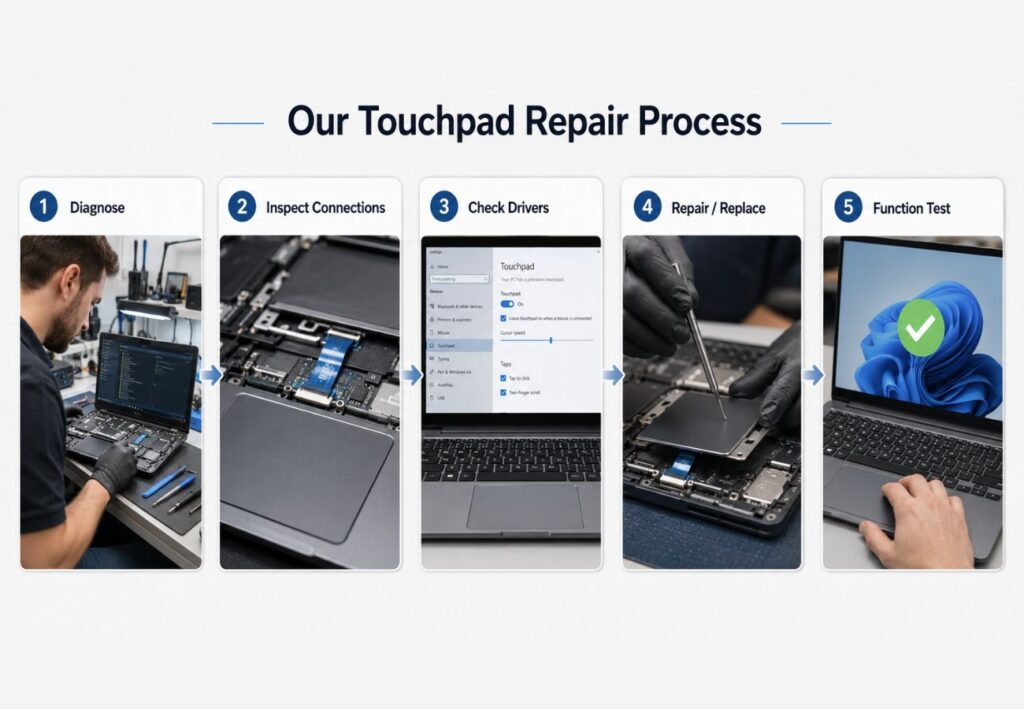
Our Touchpad Repair Process
Every repair begins with a complete diagnostic to identify the exact cause of the problem.
Our repair process includes:
Inspecting the touchpad and internal connections
Checking drivers and software settings
Repairing or replacing faulty components when required
Testing all touchpad functions before returning your device
Every repair starts with a professional diagnostic to identify the exact cause of the problem. We recommend only the repairs your laptop needs and thoroughly test the touchpad before returning your device.


Glorious Years

Satisfaction Rate

Devices Repaired

Happy Customers
Testimonial
What the Las Vegas Community Says About Us on Google
Our Google My Business reviews are the talk of the town! Discover how our same-day repair service in Las Vegas resolved their tech emergencies.
Not only did they fix and allow same-day pickup, but Abi stayed late to ensure it was completed.
100% transparent and honest, I'll come back here anytime I have laptop issues in the Vegas area
Device Issues? Get Expert Device Repair Today
Get professional device repair with fast diagnosis, safe troubleshooting, and complete testing to ensure stable and reliable performance.
Let’s Get In Touch To Discuss Your Issue
We reply within minutes. Your solution is just one message away.
- 365 E. Windmill Lane #140 Las Vegas NV 89123
- Mon-Fri: 8:00 AM - 9:00 PM
We Fix All Devices , All Problems!
We are trained in fixing issues like Dell laptop touchpad not working, HP EliteBook trackpad not working, and HP Pavilion trackpad not working.
Free Diagnostic
We offer a free diagnostic service to identify the root cause.
Comprehensive Repairs
We fix touchpad hardware, software, and driver issues expertly.
Brand Expertise
We deal with Dell, HP, Asus, Lenovo, and Acer laptops.
90-Day Repair Warranty
Enjoy added peace of mind with our 90-day warranty on eligible touchpad repair services.
Frequently Asked Questions
Yes. Many touchpad problems can be repaired without replacing the entire laptop. If replacement is necessary, we’ll recommend the most suitable option.
Touchpad issues can be caused by disabled settings, outdated drivers, software conflicts, or hardware damage. A professional diagnosis can identify the exact cause.
Most touchpad repairs are completed within a few hours, depending on the laptop model and the nature of the issue.
Gently clean the touchpad with a soft cloth and water; avoid strong chemicals and too much moisture.
Press the Fn key + touchpad icon or disable it in Device Manager or BIOS settings.
Yes. We repair touchpads for Dell, HP, Lenovo, ASUS, Acer, Samsung, MSI, Microsoft Surface, and many other laptop brands.
If the issue is software-related, reinstalling or updating the driver may solve it. If the problem is caused by faulty hardware, a repair or replacement will be required.
