 Skip to content



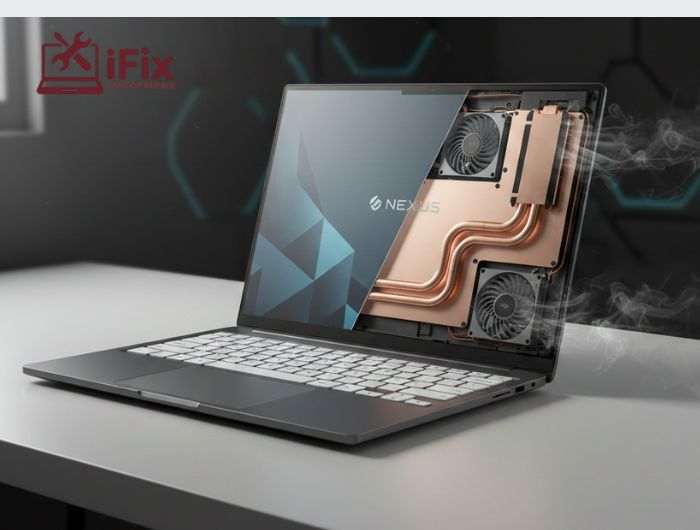
It is more important than ever to comprehend laptop cooling technology. Extreme performance and extremely thin designs present two challenges for today’s laptops. Laptops have changed over the last ten years from being simple work tools to tiny powerhouses that can run AI programs, AAA games, virtual machines, large-scale coding, and real-time rendering. However, one enduring issue is brought about by all this power heat. This problem often leads users to seek professional laptop repair services to maintain performance and prevent long-term hardware damage.
This is where the story of thermal innovation gets fascinating.
The Surprising Impact of Laptop Cooling Technology on Performance
Many users assume laptop cooling is just about preventing overheating. In reality, it impacts much more:
- Sustained performance
- CPU and GPU boost clocks
- Battery efficiency
- Fan noise control
- Component lifespan
- User comfort
- Long-term reliability
If a processor can’t maintain its coolness, even the fastest one has limitations. The triangle of processing power, energy efficiency, and heat dissipation is how engineers define performance.
The entire experience is negatively impacted if one aspect fails. Because of this, modern laptops with cutting-edge laptop cooling technology feel quicker, quieter, and more dependable than models from only five years ago, often reducing the need for basic laptop cooling hacks to manage heat and performance.
The Cooling Challenge: Why Modern Laptops Need an Upgrade
Laptops today have to balance multiple pressures:
- Ultra-thin Designs – A decade ago, 22mm was “thin.” Today, 15mm is common for performance laptops, while CPUs produce far more heat.
- Powerful GPUs in Compact Bodies – Mobile GPUs now rival desktops, increasing thermal demands.
- High-Density Batteries – More battery life leaves less room for heat pipes and fans.
- Higher User Expectations – Gamers, creators, and professionals demand heavy workloads simultaneously.
These challenges forced engineers to rethink thermal designs completely, resulting in major Laptop cooling technology breakthroughs.
Vapor Chambers: A Major Leap Over Heat Pipes
In many high-end laptops, vapour chambers have replaced conventional heat pipes as the new standard.
How They Work: As the processor heats up, a tiny amount of liquid inside a vacuum-sealed plate evaporates, distributing heat uniformly, and then condenses back into liquid.
Advantages:
- Wider heat distribution
- More efficient phase change
- Supports multi-chip layouts
- Works with thin laptops
Examples: Razer Blade 15 and Lenovo Legion 7 feature full vapor chambers, maintaining lower temperatures under stress.
Personal Experience: Using a vapor chamber-equipped laptop for the first time felt immediate: lower fan noise, cooler palms, and steady CPU boosts without throttling.
When cooling performance starts to decline due to wear or dust buildup, timely cpu cooling fan repair services help restore proper airflow, reduce overheating, and maintain consistent performance.
Liquid Metal Thermal Interface Materials
Next-gen laptops increasingly use liquid metal for laptop cooling instead of traditional thermal paste.
Benefits:
- Extremely high thermal conductivity (70–80 W/mK)
- Significant CPU/GPU temperature reduction
- Higher sustained clock speeds
Challenges: Liquid metal conducts electricity. Manufacturers address this with protective barriers and precise application.
Real Products: ASUS ROG Zephyrus, MSI Titan GT77, Intel high-end reference laptops.
If your laptop struggles under heavy workloads, professional laptop cooling repair Las Vegas can replace thermal paste or install liquid metal TIM to optimize performance.
Multi-Fan Designs
Dual or triple-fan architectures are now standard.
Benefits:
- Greater airflow
- Better CPU/GPU separation
- Faster hot air expulsion
- Targeted cooling for VRMs and memory
Example: Acer Predator Triton 500’s triple-fan setup improves cooling efficiency with custom metal fans.
Personal Observation: Laptops with multi-fan systems remain cooler and quieter under sustained load.
Smarter Airflow and Vent Placement
Gone are the days of blocked bottom vents. Next-gen laptops feature:
- Rear and side exhausts
- Bottom mesh panels
- Internal airflow tunnels
- Raised hinge designs (ASUS ErgoLift)
Engineering Insight: Reducing turbulence in airflow increases efficiency while keeping fan noise low.
AI-Based Thermal Management
Modern laptops leverage AI to dynamically manage heat.
What It Does:
- Monitors real-time temperatures
- Predicts spikes
- Adjusts fan speed and voltage
- Shifts workloads between cores
Example: Lenovo Legion laptops balance CPU/GPU load intelligently.
→ Want to learn how AI keeps your device cool during gaming or streaming? Check out our guide: Why Your Laptop Overheats While Streaming on Netflix, Gaming, or Zoom.
Graphene & Advanced Materials
Graphene sheets now complement heat pipes and vapor chambers.
Benefits:
- Rapid heat spreading
- Lightweight and thin
- Reduces hotspots
Examples: HP Omen series, Xiaomi laptops
Precision Fan Blade Engineering
Next-gen fans use liquid-crystal polymer, ultra-thin blades, and 3D-curved aerodynamic shapes for higher RPM with less noise.
Example: ASUS Arc Flow Fan has 84 blades at 0.1mm thickness, minimizing turbulence.
Dedicated Thermal Zones
Modern laptops isolate heat for CPU, GPU, VRMs, RAM, and SSDs, preventing heat cycles and reducing throttling.
System-Level Thermal Redesign
Next-gen laptops rethink layouts entirely:
- Shifted batteries away from heat zones
- Separated motherboard layers
- Repositioned WiFi modules
- Optimized chassis and internal pressure
These innovations improve overall thermal efficiency, making devices quieter and longer-lasting.
Experiencing overheating or noisy fans? Visit our Las Vegas laptop shop or schedule a laptop fan replacement Las Vegas
Comparing Traditional vs Next-Gen Cooling
Aspect | Traditional | Next-Gen | Improvement |
Heat Dissipation | Heat pipes | Vapor chambers + heat pipes | High |
TIM | Silicone paste | Liquid metal TIM | Very High |
Fan | Single fan | Dual/triple LCP fans | High |
Airflow | Bottom only | Side/rear + tunnels | Very High |
Thermal Mgmt | Fixed fan curves | AI-driven dynamic | High |
Heat Spread Material | Copper | Graphene/carbon | Medium |
Processor Evolution & Thermal Demands
Next-gen CPUs and GPUs have higher base/boost clocks, more cores, and higher TDPs, driving the need for Laptop Cooling Technology innovations.
If your CPU is overheating or not performing at its best, professional repair can make a big difference.
Real-World Impact
Next-gen cooling delivers:
- Consistent performance
- Minimal throttling
- Quieter operation
- Comfortable surfaces
- Longer component life
Personal Test: A 2024 laptop with a vapor chamber, liquid metal TIM, and LCP fans ran 3D rendering tasks at 74°C with zero throttling, while a 2018 model peaked at 92°C with loud fans.
iFixLaptopRepair: Advanced Cooling Solutions for Next-Gen Laptops
Even the best Laptop Cooling Technology can struggle over time. iFixLaptopRepair in Las Vegas fixes overheating, noisy fans, and thermal issues with expertise in:
- Fan replacement & thermal paste upgrades
- Liquid metal laptop cooling
- Optimizing vapor chamber and multi-fan systems
Keep your laptop cool and performing at its best—contact iFixLaptopRepair today.
The Future of Laptop Cooling Technology
Emerging innovations include:
- AI-adaptive vapor chambers
- Micro liquid cooling loops
- Carbon nanotube heat spreaders
- Multi-layer smart heat sensors
- Active backplate cooling
- Fanless designs using advanced metals
These technologies promise even cooler, quieter, and longer-lasting laptops.
Final Thoughts
Choosing a laptop today isn’t just about raw power. Understanding Laptop Cooling Technology helps you pick a device that sustains performance while staying quiet and cool. Features like vapor chambers, liquid metal TIM, optimized vents, LCP fans, and AI-driven systems are not marketing fluff; they’re the reason next-gen laptops outperform older models.
Facing performance issues or overheating? Contact our experts for laptop overheating repair or schedule a consultation via laptop repair Las Vegas to restore peak performance.

