 Skip to content



CPU overheating is one of the most common reasons computers slow down, crash, or stop working completely. Many users only notice the issue when their PC shuts down suddenly or feels hot to the touch. If you are already searching for CPU overheating repair Las Vegas, understanding cooling systems is a smart first step.
In this guide, we explain liquid cooling and air cooling in simple terms. You will learn how each system works, which one protects your CPU better, and when professional CPU overheating repair Las Vegas services are needed. The goal is to help you make a safe and informed decision for your PC.
What is CPU Cooling and Why is it Important?
Your CPU is the brain of your computer. Every task, from opening apps to gaming, creates heat. If that heat is not controlled, problems start quickly.
When a CPU gets too hot, it lowers its speed to protect itself. This is called thermal throttling. Over time, constant heat can shorten the life of your CPU and other parts.
- According to hardware studies, CPUs that run above safe temperatures for long periods can lose up to 30% of their expected lifespan. That is why proper cooling and timely CPU cooling repair matter.
What is Air Cooling?
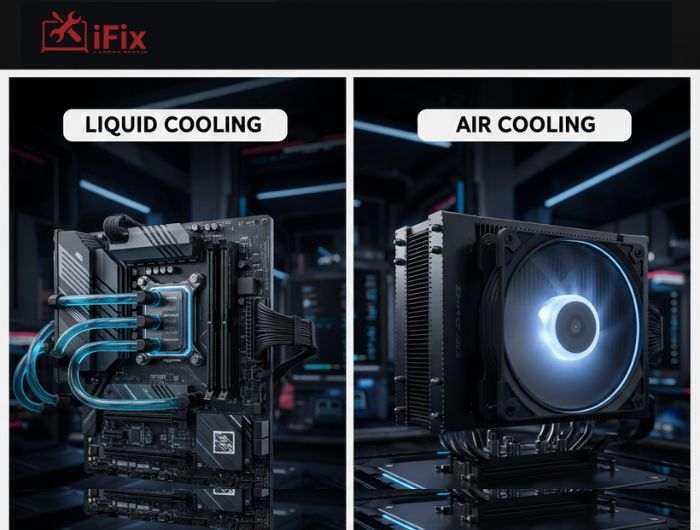
Air cooling is the most common cooling method used in desktop computers. It uses metal heatsinks and fans to pull heat away from the CPU and push it out of the case.
Most office PCs and budget systems rely on air cooling because it is simple and affordable.
Pros of Air Cooling
- Lower cost compared to liquid cooling
- Easy to install and replace
- Very reliable with fewer parts
Cons of Air Cooling
- Less effective for high-performance CPUs
- Can get noisy under heavy load
- Large coolers may block RAM or GPU space
For basic systems, an air cooling CPU service can often fix overheating issues by cleaning dust or replacing worn fans.
What is Liquid Cooling?
Liquid cooling uses water or a special coolant to absorb heat from the CPU and move it to a radiator. Fans then push the heat out of the system.
There are two main types:
- AIO (All-in-One) liquid coolers
- Custom liquid cooling loops
Liquid cooling is common in gaming PCs and workstations that handle heavy tasks.
Pros of Liquid Cooling
- Better heat control for powerful CPUs
- Quieter operation in many cases
- Ideal for gaming and long sessions
Cons of Liquid Cooling
- Higher cost
- More complex setup
- Pumps can fail over time
If a pump stops working, liquid cooling PC repair is required quickly to avoid serious damage.
Liquid Cooling vs Air Cooling: Temperature Control Comparison
Here is a simple comparison to show how both systems perform.
Feature | Air Cooling | Liquid Cooling |
Idle Temperatures | Good | Very Good |
Heavy Load Cooling | Limited | Excellent |
Long Gaming Sessions | Can struggle | Stable |
Noise Level | Medium to High | Low to Medium |
Repair Cost | Lower | Higher |
During stress tests, liquid cooling can lower CPU temperatures by 10 to 20 degrees Celsius compared to air cooling. This difference often prevents overheating shutdowns.
Liquid vs Air: Which Cooling Option Protects Your CPU Better Over Time?
Protection is not just about low temperatures. It is also about stability.
- Liquid cooling keeps temperatures more consistent, especially during gaming or video editing. That consistency reduces stress on the CPU.
- However, air cooling has fewer failure points. A fan failure is easier to detect and fix than a pump issue.
This is why many technicians offering CPU overheating repair Las Vegas focus on the system’s usage before recommending upgrades.
Noise Levels: Which Cooling System Is Quieter?
Noise matters, especially if you work or game for long hours.
- Air coolers rely on fans that spin faster when temperatures rise. This can cause noticeable noise.
- Liquid cooling systems move heat more efficiently, so fans often run at lower speeds. While pumps make some noise, most users find liquid cooling quieter overall.
Maintenance and Reliability Comparison
Both systems need care, but the level differs.
Air Cooling Maintenance
- Clean dust every 3 to 6 months
- Replace fans if they wear out
Liquid Cooling Maintenance
- Check pump health
- Monitor temperatures regularly
- Replace AIO units after several years
Ignoring maintenance is a common reason people need PC overheating fix services later.
Cost vs Performance: Is Liquid Cooling Worth It?
Air cooling is budget-friendly and works well for everyday use. Liquid cooling costs more but delivers better performance under stress.
If you use your PC for gaming, streaming, or design work, liquid cooling may prevent frequent CPU overheating repair Las Vegas.
For basic tasks, air cooling is often enough when properly maintained.
Which Cooling Solution Is Best for Your Use Case?
Gaming PCs
High-performance gaming systems benefit most from liquid cooling. Many gamers eventually need gaming PC cooling repair due to heavy usage.
Workstations
Video editors and developers should consider liquid cooling for long workloads.
Office and Home PCs
Air cooling is usually sufficient with routine cleaning.
Overclocked Systems
Liquid cooling is strongly recommended for safety and stability.
Why iFix Is the Go-To for CPU Cooling Repairs in Las Vegas
For expert CPU cooling solutions, iFixLaptopRepair provides professional repairs, quick turnaround, and a 90-day warranty to keep your system safe and efficient.
- 20 years of experience handling all laptops and PCs
- 90-day warranty on all repairs
- CPU cooling repair, including air and liquid systems
- Quick turnaround and expert gaming PC cooling repair
- Comprehensive maintenance to prevent future overheating
- Safe and professional service for all PC types
Final Verdict: Liquid Cooling or Air Cooling?
Both cooling systems protect your CPU when used correctly. Air cooling is reliable and simple. Liquid cooling offers stronger protection under heavy loads.
If your PC still runs hot despite good cooling, it may be time for professional CPU overheating repair Las Vegas services. Technicians can identify failing fans, dried thermal paste, or cooling system faults before permanent damage occurs.
In the end, the best choice depends on how you use your computer and how much heat it produces. Proper cooling today can save you from costly repairs tomorrow.
Have a PC that’s overheating? Contact the experts at iFix today for fast, reliable service.

