
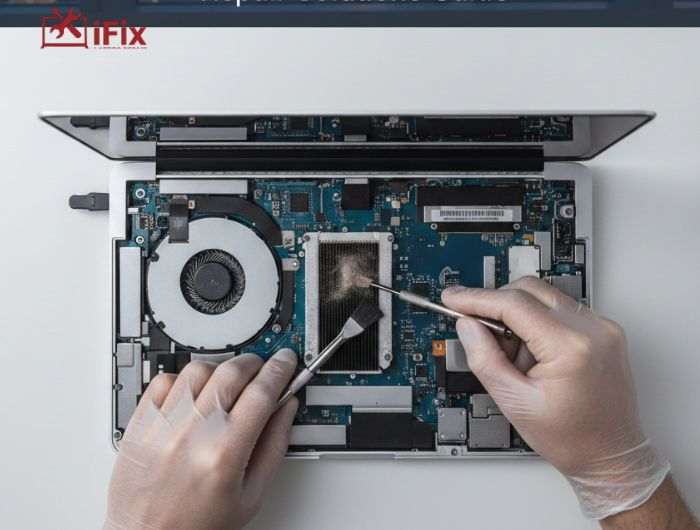
If your MacBook suddenly sounds louder than usual, you are not alone. Many users deal with this issue daily, especially in warmer areas like Las Vegas. Constant fan noise can be distracting and worrying, but it is often a sign that your device is under stress.
This guide explains what causes the problem, what you can safely check, and when MacBook fan noise repair in Las Vegas becomes necessary to protect your device.
What Loud Fan Noise on a MacBook Actually Means
MacBooks are designed to stay quiet during normal use. When the fan suddenly gets loud, it usually means the system is trying to cool itself down. The fan speeds up when internal temperatures rise or when the processor is working harder than usual.
A short burst of noise during heavy tasks is normal. However, constant or loud fan noise during simple activities like browsing or typing is not. Over time, ignoring this can affect performance and internal parts.
- If your MacBook fan is running loudly even during light use, it may be time for a professional inspection.
Causes of Loud Fan Noise on MacBook and How to Fix Them
When a MacBook fan gets loud, it is usually trying to cool the system. Below are the most common causes and the right fixes, explained plainly.
1. Dust and Dirt Inside the Fan
Cause
Over time, dust builds up inside the fan and air vents. This blocks airflow, so the fan spins faster to push heat out. This is very common, especially in dry and dusty environments like Las Vegas.
Fix:
- Professional internal fan and vent cleaning
- Removing dust restores airflow and reduces noise
Most users notice quieter performance immediately after cleaning.
2. MacBook Overheating
Cause
When the MacBook gets too hot, the fan works harder. Overheating can happen due to poor ventilation, high room temperature, or blocked air vents.
Fix:
- Use the MacBook on a hard, flat surface
- Keep vents uncovered
- Internal cleaning and thermal checks if overheating continues
MacBook overheating and fan noise often go hand in hand and should not be ignored. If your device feels unusually hot or shuts down often, read our detailed guide on What to Do When a MacBook Is Overheating? to understand the right steps to take and how to prevent further damage.
3. Heavy Apps and High CPU Usage
Cause
Apps like video editors, browsers with many tabs, or background processes can overload the processor. This makes the fan run loudly even if the MacBook feels fine.
Fix:
- Close unused apps and tabs
- Check Activity Monitor for high CPU usage
- Restart the system to clear the background load
This fix works well when the issue is software-related.
4. Old or Failing Cooling Fan
Cause
Fans wear out over time. A damaged fan may spin unevenly, make grinding sounds, or stay loud even when the MacBook is idle.
Fix:
- Cooling fan replacement by a professional
This is a permanent fix and prevents further internal damage.
5. Dried or Worn Thermal Paste
Cause
Thermal paste helps transfer heat from the processor to the cooling system. After years of use, it can dry out, causing heat to build up and the fan to overwork.
Fix:
- Thermal paste replacement during professional servicing
This helps control temperature and reduces fan noise.
6. Fan Noise After macOS Update
Cause
Sometimes a macOS update causes background indexing or system tasks that raise CPU usage temporarily.
Fix:
- Give the system time to settle after updates
- Restart the MacBook
- If noise continues, a system check is recommended
When Fixes at Home Are Not Enough
If basic steps do not reduce the noise, it is a sign that internal service is needed. Professional MacBook fan noise repair in Las Vegas usually includes cleaning, testing, and fixing the exact cause instead of guessing.
How to Tell What’s Causing the Fan Noise
Start by noticing when the noise begins. If the fan gets loud right after startup, software may be the issue. If it stays loud even when idle, hardware problems are more likely.
Check Activity Monitor to see if any apps are using too much CPU. Also, feel the bottom of your MacBook. Excessive heat is often linked to MacBook overheating and fan noise.
- Not sure if the issue is software or hardware? A quick diagnostic can save time and prevent damage.
Quick Things You Can Safely Check at Home
Before rushing to repair, there are a few safe steps you can try:
- Restart your MacBook to clear the temporary load
- Close unused apps and browser tabs
- Make sure vents are not blocked
- Avoid using the device on soft surfaces like beds
- Keep macOS updated
These steps help reduce loud fan noise on MacBook systems caused by short-term stress. However, they do not fix internal dust or failing fans.
When Fan Noise Indicates a Hardware Problem
Hardware issues are likely if:
- The fan runs all the time, loudly
- You hear grinding or rattling sounds
- The MacBook overheats quickly
- The system shuts down unexpectedly
In these cases, MacBook fan noise repair Las Vegas often involves internal cleaning, fan replacement, or thermal paste renewal. Ignoring these signs can lead to long-term heat damage.
→ Strange sounds or constant noise should never be ignored. Early repair helps extend your MacBook’s life.
Why Professional MacBook Repair Matters
Opening a MacBook without proper tools can cause more harm than good. Professionals like iFixLaptopRepair know how to safely handle delicate internal parts and correctly diagnose why your MacBook fan is running loudly.
Accurate repairs also prevent repeat issues. This is why many users choose MacBook fan noise repair in Las Vegas instead of temporary fixes.
How Long MacBook Fan Repairs Usually Take
Repair time depends on the issue:
- Internal cleaning: often same day
- Fan replacement: 1 to 2 days
- Thermal paste service: usually within 24 hours
Quick service helps prevent further overheating and reduces downtime for work or study.
Preventing Loud Fan Noise in the Future
You can reduce future issues by:
- Keeping vents clean
- Using your MacBook on hard surfaces
- Avoiding extreme heat exposure
- Scheduling regular internal cleaning
- Monitoring system temperature
Simple habits can greatly reduce the need for MacBook fan noise repair in Las Vegas later on.
When to Seek MacBook Fan Noise Repair in Las Vegas
If you are still asking, “Why is my MacBook fan so loud?” after basic checks, professional help is the safest option. Persistent noise, heat, or performance drops should never be ignored.
Timely MacBook fan noise repair in Las Vegas protects your device, improves performance, and helps avoid more expensive repairs in the future.
Final Thoughts
Loud fan noise on a MacBook should never be ignored. It often points to overheating, dust buildup, or a failing fan. Fixing the issue early helps protect performance and extend your device’s life. If the problem continues, call us or contact us for professional help.
