
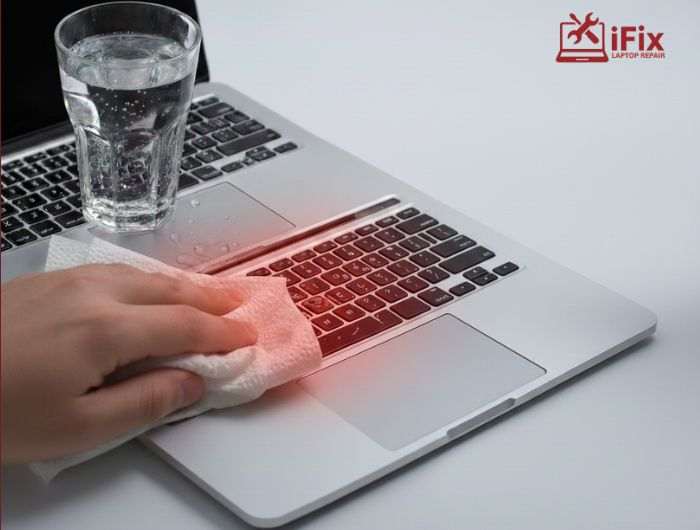
Liquid spills on MacBooks are more common than people think. Water, coffee, tea, or juice can enter the device in seconds. When this happens, most people make the same mistake. They press the power button to see if the MacBook still works. If you are looking for MacBook liquid damage repair Las Vegas, it is important to understand why turning on a wet MacBook can make a small spill much worse. Knowing what happens inside the device can help you avoid costly repairs.
How Liquid Gets Inside a MacBook
MacBooks are slim, but they are not sealed. Liquid usually enters through:
- Keyboard keys
- USB-C and charging ports
- Speaker openings and vents
Once liquid gets inside, it spreads quickly. Gravity pulls it across the internal parts. Even a few drops can reach sensitive areas like the logic board and battery connectors.
This is where the real risk begins.
Don’t Risk Your Data
We often hear stories like this:
“I spilled water on my MacBook. It turned off, but I just needed one file. I powered it on for 5 minutes to copy it—now it won’t turn on at all.”
Unfortunately, this scenario is far too common. If the logic board shorts or the CPU is damaged, your data may be lost. Unlike traditional hard drives, most modern MacBook storage is soldered directly to the motherboard. When critical components like the CPU or SSD controller fail, recovering files becomes much harder, or sometimes impossible.
What Happens the Moment You Turn It On
When a MacBook is wet, electricity and liquid become a dangerous mix. Turning it on sends power through circuits that are not meant to be connected.
This causes:
- Short circuits on the logic board
- Damage to power control chips
- Burned connectors and tiny components
Industry repair data shows that more than 70 percent of water-damaged laptops suffer extra damage because power was applied too soon. This is a major reason why water damaged macbook repair often becomes complex.
If your MacBook gets wet, do not turn it on. Immediate professional help for MacBook liquid damage repair Las Vegas can prevent more serious damage.
Why Some MacBooks Fail Immediately While Others Don’t
Many users feel confused when their MacBook turns on after a spill. They assume everything is fine. This is not always true.
There are two types of damage:
Type of Damage | What Happens |
Instant Damage | The MacBook does not turn on at all |
Delayed Damage | Works at first, fails days or weeks later |
Delayed damage happens because liquid leaves behind residue. Over time, this leads to corrosion. This is why MacBook corrosion repair is one of the most common services after spills.
Corrosion Slowly Eats Away Internal Parts
Even after the liquid dries, damage continues. Minerals and sugars in drinks create corrosion on metal parts.
Corrosion affects:
- Solder joints
- Chips and connectors
- Keyboard and trackpad circuits
This is often the reason behind a MacBook not turning on water damage appearing days later. Simple drying at home cannot stop this process.
👉 Helpful Advice:
Early inspection by a professional MacBook repair service can stop corrosion before it spreads.
Battery Damage Makes the Situation Worse
The battery is one of the most sensitive parts of a MacBook. Liquid near the battery can cause:
- Charging failure
- Overheating
- Battery swelling
Plugging in the charger while the MacBook is wet increases the risk. Many MacBook spill repair cases become serious because charging was attempted too soon.
This is another reason technicians recommend immediate shutdown.
Parts Most Often Affected by Liquid Damage
Liquid damage does not affect just one part. It usually spreads across multiple components, including:
- Logic board and power chips
- Keyboard and trackpad
- Display connectors
- Charging ports
In many cases, MacBook motherboard repair is required. This type of repair needs skilled technicians and proper cleaning tools.
What To Do Right After a Spill
If your MacBook has been exposed to liquid, acting quickly can make a huge difference in preventing serious damage. Follow these steps immediately:
Immediate Actions to Take:
- Power off the MacBook right away to prevent short circuits
- Unplug the charger and any connected accessories
- Remove any external devices like USB drives, headphones, or SD cards
- Place the MacBook on a flat, dry surface with the keyboard facing down slightly to help liquid drain
- Gently blot visible liquid with a lint-free cloth or paper towel (do not rub)
- Move the device to a cool, dry area to prevent additional moisture from spreading
Things You Should Never Do After a Spill – Avoid These Mistakes
- Do not turn it back on under any circumstances
- Do not use a hair dryer, oven, or heater—heat can warp components
- Do not rely on rice or other home remedies; they are ineffective for modern MacBooks
- Do not shake or tilt the laptop aggressively—this can spread liquid further
- Do not attempt to open the MacBook if you’re not trained; internal components are delicate
Quick professional care for MacBook liquid damage repair Las Vegas can reduce repair costs by up to 40 percent, according to laptop repair studies.
Why Professional Repair is Necessary
Real liquid damage repair involves more than drying. Proper repair includes:
- Internal inspection
- Cleaning corrosion safely
- Testing power lines and chips
Without this, damage continues silently. This is why professional MacBook liquid damage repair Las Vegas is strongly recommended after any spill.
Why iFixLaptopRepair is Trusted for MacBook Liquid Damage
iFixLaptopRepair specializes in handling complex MacBook issues, including liquid damage. Their technicians focus on saving the device, not rushing to replace parts.
Why do many users choose iFix:
- Over 20 years of experience repairing MacBooks and other laptops
- Expertise with liquid-damaged MacBooks, including logic board and motherboard repairs
- Advanced board-level diagnostic tools for accurate problem detection
- Honest assessments and clear communication about repair options and costs
- Free diagnostics to evaluate your device before any repair
- Repairs using high-quality OEM parts for long-lasting performance
- 90-day warranty on repairs to ensure peace of mind
- Focused on saving your data whenever possible
Whether you need water damaged macbook repair or detailed logic board work, iFixLaptopRepair provides reliable solutions.
👉 Local Repair Note:
For dependable MacBook liquid damage repair Las Vegas, choosing a skilled local repair team matters.
Final Thoughts
Turning on a wet MacBook may feel harmless, but it often causes the most damage. Electricity, liquid, and time work together to harm internal parts.
Understanding the process helps you act smarter. If a spill happens, keep the MacBook off and seek professional help. Early action can save your device, your data, and your money. Don’t wait, contact us today for expert MacBook liquid damage repair and get your MacBook inspected by trained technicians.
